Laboratory Information Management System

Your laboratory.
One connected LIMS.

Manage the work around every result. DataToCare connects patient and sample records, test workflows, instruments, stock, equipment and quality in a shared laboratory platform.

Explore the LIMS features
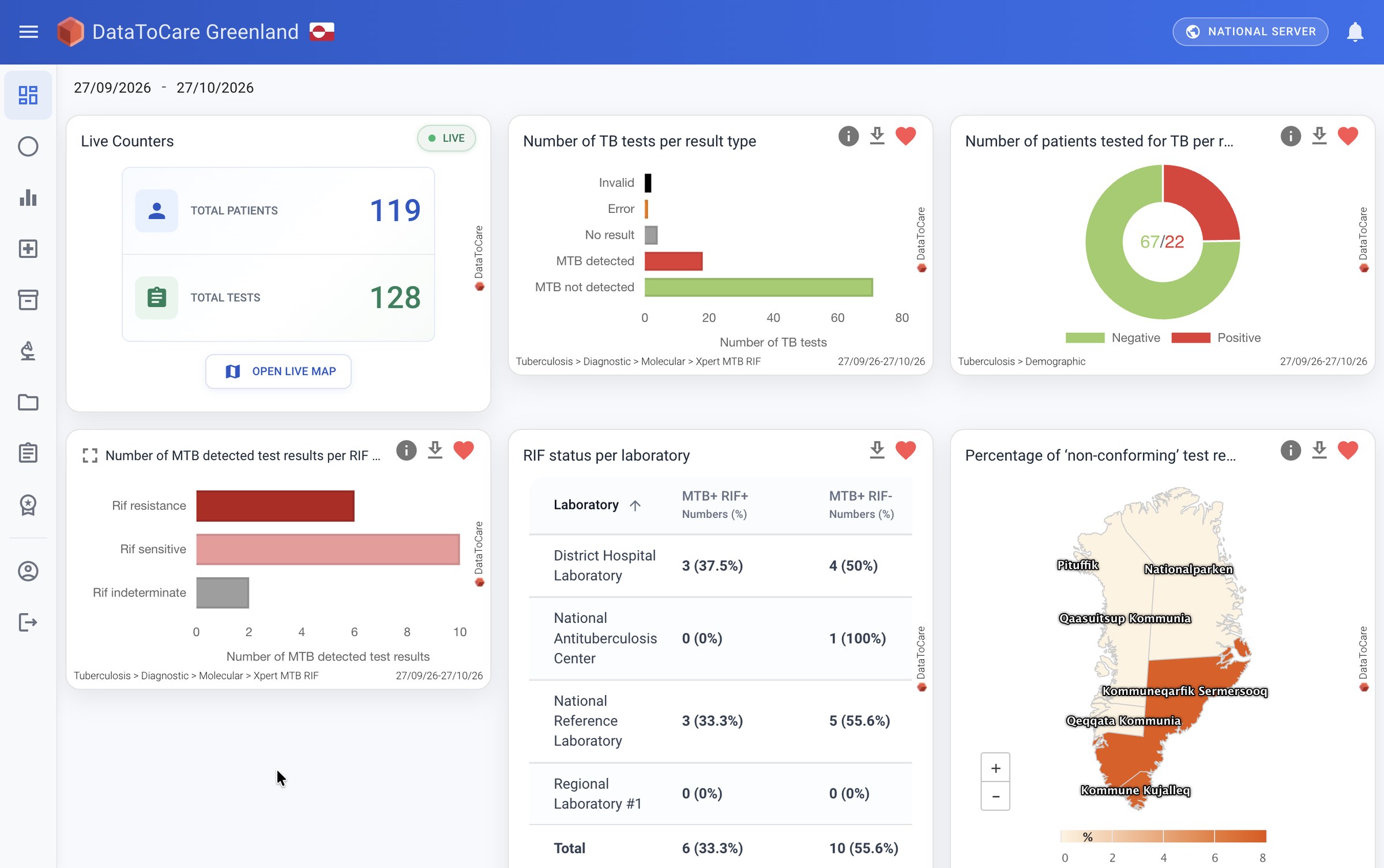
DataToCare Web · LIMS & analytics
Actual DataToCare Web dashboard showing laboratory indicators, charts and a map with demonstration data.
Actual dashboard · supplied demo data. This view illustrates analytics within the wider LIMS.

The LIMS feature set

The workflow.
And everything around it.

From registration to reporting, configure the workflow for your laboratory and programme. Explore the functions documented across Desktop, Mobile and Web.

01

Samples, test requests & validation

Track test requests, orders and results through the laboratory workflow, whether captured from an instrument or entered by a team member.

  • Manage patients, samples, test requests, test orders and test results.
  • Automatic and manual test creation; Desktop sends test orders to supported instruments and receives the results, including GeneXpert Dx, Abbott m2000 and PlusLife.
  • Configurable result-entry forms for bacteriology, parasitology, biochemistry, hematology, virology, immunology/serology, toxicology and hormone testing.
  • Track lifecycle states and configure multi-level validation per laboratory, including validation and rejection on Web.
  • Link tests to prescribers, operators and medical records; print result sheets and export local registers to XLSX.
02

Patients, contacts & referral

Keep the patient and the people involved connected to each request and result.

  • Register, search and update patients, medical history and consultation records.
  • Detect duplicate patients and merge records on Web.
  • Manage prescribers, operators, clinicians and laboratory managers, with synchronized contacts.
  • Record consent and retain its history and traceability.
  • Support Remote Patient Referral between primary facilities and laboratories, linking Mobile requests with Desktop processing and Web.
  • Capture and attach test-result photos in Mobile; track requests through validation.
03

Inventory, products & batches

  • Manage products, stock, batches, lots and transfers.
  • Track quantities, expiry dates, storage and pricing details.
  • Monitor expired and empty stock centrally.
  • Track automatic cartridge consumption for configured workflows, including Xpert.
  • Synchronize laboratory inventory with the central server.
04

Equipment & preventive maintenance

  • Register equipment and track status, maintenance and calibration.
  • Schedule maintenance tasks with deadlines and preventive reminders for weekly, monthly and yearly work.
  • Keep a maintenance-history timeline.
  • Track calibration and disinfection activities.
05

Quality control & accreditation support

  • Manage External Quality Control (EQC) activities.
  • Track accreditation documentation and related work.
  • Monitor quality indicators and compliance processes.
  • Retain traceable validation and equipment records for quality review.

Accreditation support describes management functions; it does not imply that using the software certifies a laboratory.

06

Indicators, dashboards & reporting

  • Explore configurable charts, maps, tables and drill-down, with date, geography, disease, test and method filters.
  • Review historical performance indicators, gauge views, laboratory connectivity and incidents.
  • Define custom indicator rules, schedules and thresholds, including email and in-app alerts.
  • Produce scheduled or on-demand XLSX reports; configure content, frequency, recipients and access roles.
  • Analyze epidemiological, demographic and operational data, with Intelligence adding explainable aggregate analysis.
07

Access, consent & audit trails

  • Role-based accounts and permissions, with centrally managed access and Mobile profiles.
  • Trace critical changes to tests, equipment, validations, users and configuration.
  • Filter and export local and central audit/system logs.
  • Apply patient/system data-retention and archiving policies.
  • Keep data governance and ownership under the hosting country or institution.
08

Offline work, synchronization & recovery

  • Work offline on Desktop and Mobile, then synchronize when connectivity returns.
  • Use Internet or configured SMS transmission; monitor USB modem status and SIM balance in Desktop.
  • Archive/import .dtc data and re-synchronize records.
  • Export Desktop recovery packages from Web to restore or replace a workstation.
  • Replicate and back up to secondary servers; buffer forwarding between facility and national instances.
09

Notifications, configuration & support

  • Share validated results and configured notifications with patients, prescribers and authorized third parties using SMS/email.
  • Configure country-specific capture, report settings and access roles.
  • Use Desktop’s built-in update checks, diagnostic tools and exportable support logs.
  • Distribute updates online or through offline setup files; Mobile updates are available through Play Store.
  • Use the multilingual interface: English, French, Russian, Spanish, Portuguese, Indonesian, Khmer, Arabic, Swahili, Lingala, Kirundi and Filipino, plus Hausa and Amharic on Web.

Functions depend on the component, configured workflow and deployment.

The full laboratory menu

Every discipline.
One laboratory workflow.

290+ tests across eight disciplines, with automated capture where instrument interfaces are configured.

Molecular & priority diseases

TB, HIV, hepatitis B/C, HPV, CT/NG, malaria and COVID-19

Hematology

CBC, coagulation, blood grouping and sickle cell

Clinical biochemistry

Renal, liver, lipids, glucose and electrolytes

Bacteriology

Staining, culture, antibiogram and serotyping

Parasitology

Stool and blood microscopy, malaria RDT and THA

Virology

Viral PCR, serology and cell culture

Immunology / serology

ELISA, hepatitis, tumour and autoimmune markers

Toxicology & hormones

Thyroid, fertility hormones and drug levels

Search all documented tests and instruments →

Choose the deployment

A facility LIMS.
A connected network.

01 / Standalone

Web at the centre

Run DataToCare Web independently as a centralized LIMS and reporting platform, accessed through the internet or intranet.

02 / Integrated

Local work, central visibility

Connect Desktop, Android Mobile and Light to Web for local capture, synchronized workflows and multi-site management.

03 / Facility to national

Link LIMS instances

Forward facility Web data to a national Web instance, with buffering, synchronization monitoring and relayed update/DHIS2 requests.

Instrument connectivity

From diagnostic instruments
to connected laboratory intelligence.

Send test orders to supported instruments, receive results automatically, and exchange patient information and results with national health systems.

01 / Diagnostic instruments

  • Supplied Cepheid GeneXpert instrument illustration.CepheidGeneXpert DxOrders + results
  • Supplied Abbott m2000 instrument illustration.Abbottm2000Orders + results
  • Supplied Molbio Truenat instrument illustration.MolbioTruenatResults to Web
  • Supplied Sysmex analyzer-family illustration; exact model to be confirmed.SysmexAnalyzer familyResult collection
  • Supplied Roche cobas instrument-family illustration.RochecobasConfigured interface
  • Supplied Pluslife diagnostic analyzer illustration; exact model to be confirmed.PlusLifeDiagnostic analyzerOrders + results

Representative instruments; exact model and driver are confirmed for each deployment. Truenat supports a separate result-push route directly to Web.

ResultsTest orders

02 / At the laboratory

DataToCare
Desktop

Local laboratory workflows

  • Send test orders and receive instrument results
  • Link patients, samples and test orders
  • Review, validate and print results
  • Store locally when offline

Configured instrument interfaces

ASTMHL7

Used where supported by the selected instrument and driver. Other model-specific data sources may apply.

Internet / SMS

03 / Consolidate & manage

DataToCare
Web

Central laboratory data platform

  • Facility and multi-site operations
  • Configurable validation and quality workflows
  • Dashboards, reports and Intelligence
  • Exchange with health information systems
Bidirectional examples: DataToCare sends test orders to GeneXpert Dx, Abbott m2000 and PlusLife, and receives their results. Results synchronize to Web over the internet or configured SMS; patient/request retrieval uses configured APIs. Capture routes and protocols depend on the model, driver and deployment.

Mobile → request and referralField teams create requests and capture results, with offline synchronization to Web and referral workflows linked to Desktop.

Light → automatic result transferResults move from diagnostic instruments to Web without manual data entry, with automatic catch-up after internet interruptions.

Web → standalone LIMSUse Web directly for centralized laboratory workflows, or connect facility instances to a national instance with buffered forwarding.

GeneXpert Dx & Abbott m2000
Bidirectional: test orders out, results back. Desktop connects through DataToCare LIS middleware using configured ASTM socket interfaces; the presentation includes Abbott m2000sp and m2000rt.
PlusLife
Bidirectional test orders and results through the configured instrument interface; exact model and driver are confirmed during deployment.
Molbio Truenat
The Truenat system can push available results in JSON directly to DataToCare Web, providing a route that bypasses Desktop.
Sysmex
Result collection through DataToCare LIS middleware and Desktop, using a configured ASTM socket interface.
QIAGEN QIAreach
QIAreach software exports validated results and patient information to CSV files; Desktop reads those files before forwarding data to Web.
Discuss your instruments and workflow

Interoperability

A LIMS that works
with your health systems.

Exchange data with DHIS2, eTB Manager, TB-MIS and OpenMRS through configured interfaces, alongside other laboratory and health systems.

DHIS2
Bidirectional Tracker API
eTB Manager
Patient & result export · API
Nadis
Result export · HL7 / FTP

DHIS2 / Two-way Tracker exchange

Patient details in.
Linked results back.

DataToCare retrieves patient details from DHIS2 Tracker and sends new patient registrations and linked test results back through the configured API.

Patient already in DHIS2

  1. Search by patient name or ID in DataToCare.
  2. Retrieve the existing patient information through the DHIS2 API.
  3. Create the test in DataToCare and process it in the laboratory.
  4. Return the result to DHIS2, linked to the correct patient, programme and organisation.

Patient created in DataToCare

  1. Create the patient in DataToCare when no DHIS2 record is found.
  2. Register the patient automatically in DHIS2 through the API.
  3. Create and process the test in DataToCare.
  4. Send the linked result to DHIS2 Tracker for programme staff to view and verify.

Aggregate reporting is a separate workflow: DataToCare Web exports aggregated indicators to DHIS2 Data Sets on a configured schedule, such as weekly or monthly.

Standards & architecture

Built to exchange.

HL7 FHIR, HL7 v2 and ASTM support standards-based exchange; OpenHIE provides an architectural framework for health information sharing. Profiles and interfaces are agreed for each deployment.

LIS & LIMS

Connect and manage.

LIS functions cover instrument connectivity, results, stock and device monitoring. LIMS functions bring these into end-to-end laboratory workflows, from requests and samples to reviewed results.

The technical specification also lists HL7/MLLP, JSON, CSV and SQL interfaces, ITIS (web-service API), BACTERIO (database API) and bidirectional TB-MIS integration. Model-specific interfaces and external-system access are confirmed during deployment.

eTB Manager & ITIS
DataToCare Web exports patient information and test results through the receiving system’s API.
Nadis
DataToCare sends result files in HL7 format over FTP.
ABLab Bacterio
DataToCare Web shares patient data and results through the configured SQL/database integration.
TB-MIS
Configured workflows retrieve case or test-request data and return results linked by patient/programme identifiers; the Truenat route can match a TB-MIS code to its patient record. API availability and the receiving database workflow are confirmed for each deployment.

Interface direction and transport depend on the selected instrument and receiving system.

Licensing & implementation

Plan the platform for your programme.

The v6 specification describes a royalty-free perpetual licence for non-commercial use, with source access on request for non-commercial entities. Contact Savics for applicable terms and deployment support.

Discuss your LIMS

Better-connected labs start with a conversation.

Tell us about your laboratory network or national programme. We’ll show you DataToCare with your instruments, your reports and your connectivity constraints in mind.

Or write to support@savics.org